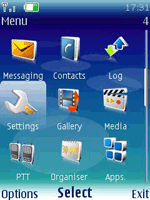
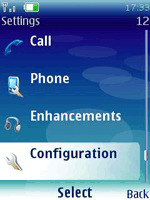
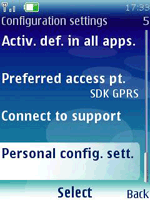
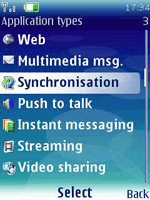
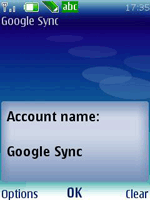
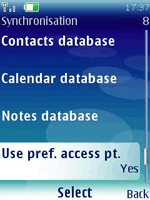
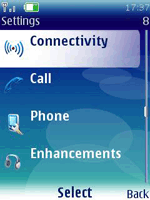
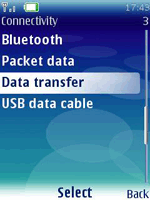
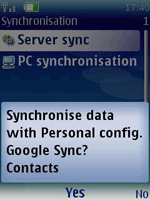
nokia s40系统使用Google Sync服务

Google今天推出了Google Sync服务,能够让Google Contacts或Calendars和你的iPhone,Symbian,BlackBerry和WM系统进行信息同步。但是这些都是智能手机,像我的nokia6300能不能使用呢,答案是肯定的!

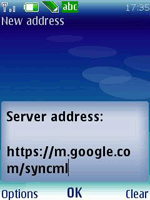
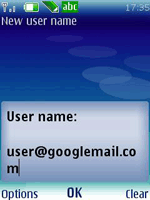
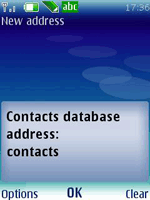
google提供的设置方法如下,不做翻译,请对照图片进行.

To set up Google Sync on a Nokia N-Series or E-Series phone (Symbian S60 3rd Edition), please follow these steps:

Note: The images below may vary slightly from the images on your particular phone.

  1. Open your Contacts application
  2. Select ‘Synchronization > Settings’ from the ‘Options’ menu. This will open the Sync application.

    Sync application

  3. From the Options menu select ‘New sync profile’

    New sync profile

  4. Choose any name you like for ‘Sync profile name’ Sync profile name
  5. Select and click ‘Applications’
    Note: You will see a list of all content types that your phone can synchronize; however, currently Google Sync only supports Contacts.
  6. Select and click ‘Contacts’
    • Make sure the ‘Include in Sync’ option is set to ‘Yes’
    • Define the ‘Remote Database’ option as ‘contacts’. It needs to be spelled exactly like this (lower case), or Google Sync will not work.

      Remote database

    • Click ‘Back’ to exit this screen and save your settings
    • Ensure that only Contacts have ‘Settings defined’ and all other content types say ‘Sett. not defined’

      Settings defined

  7. Click ‘Back’ to exit this screen and save your settings
  8. Select and click ‘Connection Settings’
  9. Enter the following values:
    • Server version: 1.2
    • Server ID: Google (capital ‘G’ is important)
    • Data bearer: Internet
    • Access point: the Internet access point for your carrier.

      Server version, server ID, data bearer, access point

    • Host address: https://m.google.com/syncml (Important to enter https for a secure connection)
    • Port: 443
    • User name: your Google Account username, e.g. you@googlemail.com
    • Password: your Google password
    • Leave other values unchanged

      Host address, port, user name, password

  10. Click ‘Back’ to exit this screen and save your settings
  11. Click ‘Back’ again to exit the Sync profile settings
  12. Highlight the your Sync profile and select ‘Synchronize’ from the ‘Options’ menu to synchronize your contacts with Google

    Synchronise

更多类型手机设置:

- Google Sync for BlackBerry
- Google Sync for iPhone
- Google Sync for Windows Mobile
- Google Sync for Nokia/Symbian
- Google Sync for Motorola
- Google Sync for Sony Ericsson

Technorati 标签: ,
Related Posts with Thumbnails
分享到社会化书签:
  • Digg
  • del.icio.us
  • Facebook
  • Mixx
  • Buzz
  • Google Bookmarks
  • BlinkList
  • LinkedIn
  • Live
  • MySpace
  • Reddit
  • StumbleUpon
  • Technorati
  • Twitter
  • Yahoo! Buzz
  • NewsVine
  • Netvibes
  • 豆瓣
  • 豆瓣九点
  • QQ书签
  • Qzone
  • 人人网
  • 开心网
  • 百度搜藏

随机文章

Leave a comment

Your comment

blog comments powered by Disqus